In a console application in .Net Core, you don’t have the appsettings.json file. In order to add this file, add a JSON file with the same name (or any name that you want) and make the following changes to the file in property:
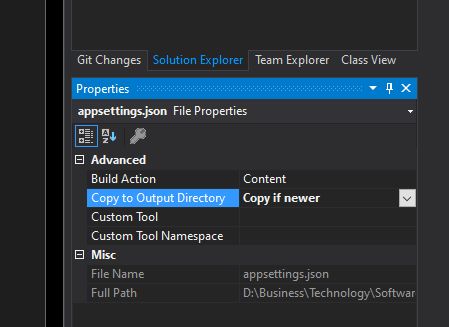
Now, you should add some configuration to read this file as it’s a console application and it’s not configured by default:
class Program

    {

        static void Main(string[] args)

        {

            RegisterServices(args);

        }


        private static ServiceProvider RegisterServices(string[] args)

        {

            IConfiguration configuration = SetupConfiguration(args);

            var serviceProvider = new ServiceCollection();

            serviceProvider.AddSingleton(configuration);

            return serviceProvider.BuildServiceProvider();

        }


        private static IConfiguration SetupConfiguration(string[] args)

        {

            return new ConfigurationBuilder()

                .SetBasePath(Directory.GetCurrentDirectory())

                .AddJsonFile("appsettings.json")

                .Build();

        }

    }
Note that the SetBasePath() method lives in Microsoft.Extensions.Configuration.Json library.